On this page
What a picker actually needs
A picking screen should be fast, physical, and hard to misunderstand. The picker should not need to think about which order an item belongs to before scanning it. If the item is in the pick batch, scanning it should reduce the quantity left.
That is especially useful for stores that use Magento for catalog data, Veeqo for order flow, and a scanner phone for stockroom work.
Why pick totals are simpler
For many small stores, a totals-only pick is easier than moving order by order. If three orders contain the same SKU, the picker can see one row with the total quantity needed instead of three repeated rows.
- Combine matching SKUs across the selected pick.
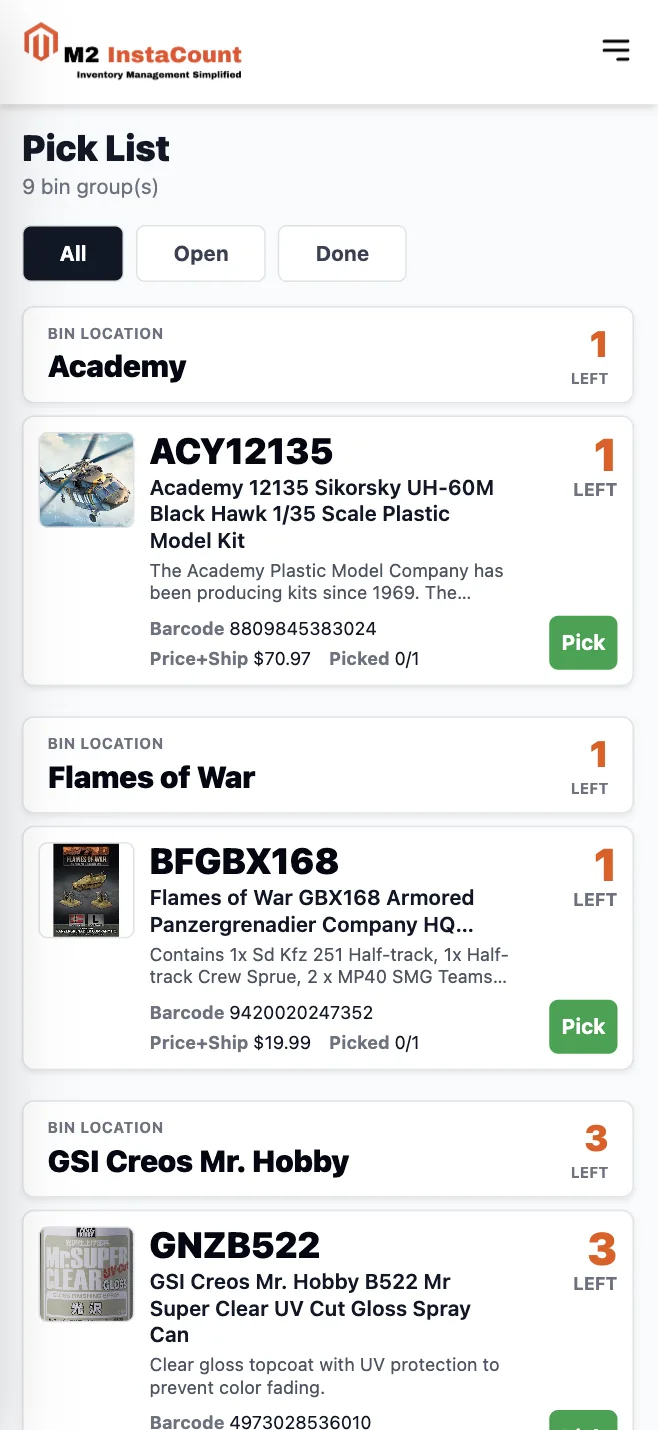
- Group items by Veeqo bin location so the pick route is easier to follow.
- Sort items within each bin by SKU so rows are predictable.
- Allow scanning any item in the batch, in any order.
- Move completed items to the bottom so the remaining work stays visible.
How the Veeqo tag-based pick works
- Select in Veeqo: add the
M2_PICKtag to the awaiting-fulfillment orders you want in the batch. Sending orders to a native Veeqo pick alone does not select them for M2 InstaCount. - Import the batch: create a pick in M2 InstaCount. It imports the eligible tagged orders and combines matching items into total quantities.
- Pick in any order: scan a matching barcode or mark a unit picked manually. The remaining quantity changes and completed rows move below open work.
- Complete and tag: when the batch is finished, use Complete & Tag Veeqo. It adds
M2_PICKEDand removesM2_PICKfrom the imported orders.
Separate from native Veeqo picking: scans do not set Veeqo's native picked-line state, and completing the batch does not ship orders. If you also started a native Veeqo pick, finish or cancel that separately according to your own process. Cancelling a local M2 InstaCount batch leaves Veeqo tags unchanged.
Android scanner settings that worked in production
On the Android scanner phone purchased from Veeqo, the working setup was Keyboard event single with a Tab terminator. The website also accepts Enter. Menu names can vary between scanner models and software versions.
- Use keyboard output, not intent broadcast, so the browser receives the barcode as text.
- First scan into an editable field in a notes app. Check that the complete barcode appears. A scanner beep without text means decoding succeeded but keyboard delivery still needs checking.
- Then test a barcode included in the active M2 InstaCount batch. No scan-box tap is needed during normal picking; you can also mark an item picked manually.
- If scans stop after switching apps, recheck the active scanner profile and output mode. The website cannot change Android scanner settings.
What the picking screen should show
Average across four timed picks by one operator, compared with native Veeqo picking on the same Android scanner. Timing ran from the first item scan to the last. Read the methodology.
Strong SKU
SKU should be the easiest text to see because it is the safest identifier when products look similar.
Useful product context
Image, title, price with shipping, barcode, and short expandable description help confirm the right item.
Obvious scan feedback
Correct scans should feel immediate. Mismatches should be impossible to miss before the picker moves on.
The best version is boring in the right way: a clean list, grouped by bin, optimized for the scanner phone, and easy to use while standing in the stockroom.
FAQ
Can M2 InstaCount automatically mark Veeqo line items as picked?
No. M2 InstaCount records progress in a local batch. Complete & Tag Veeqo adds M2_PICKED and removes M2_PICK from the imported orders. It does not update native Veeqo picked-line status or ship an order. Any native Veeqo pick you started must be handled separately.
Can items be picked in any order?
Yes. Scan any item included in the batch, regardless of its order or position in the list. Matching items are combined into total quantities, grouped by Veeqo bin, and sorted by SKU within each bin.
Which scanner input mode does the website need?
Use keyboard output rather than intent broadcast. On the tested Android scanner purchased from Veeqo, Keyboard event single with a Tab terminator worked. Enter is also supported. Scan a barcode into an editable notes field first to check that the scanner sends text; a beep alone does not confirm keyboard output.
Should picking be grouped by order or by item?
For batch picking, item totals are often faster. The user can scan any item in the pick, and the screen shows what is left across the whole batch.
Why group by bin location?
Bin grouping helps the picker move through the stockroom in a cleaner sequence instead of bouncing between locations.
Can completed rows disappear?
They should usually compress or move lower on the page, not vanish completely. That gives confidence without letting completed work crowd the active list.